Pharma Strategy Blog

Commentary on Pharma & Biotech Oncology / Hematology New Product Development

Posts tagged ‘web 2.0’

“Fully 71% of online Americans use video-sharing sites such as YouTube and Vimeo, up from 66% a year earlier. The use of video-sharing sites on any given day also jumped five percentage points, from 23% of online Americans in May 2010 to 28% in May 2011.”

Pew Internet (2011)

This is a trend I’ve also noticed amongst my friends over the past year, largely driven by more of them using smartphones and iPads, which make sharing and watching video a whole lot easier.

In the past, I’ve been rather frustrated with Pharmaland and their resolutely horrid web 1.0 branded and unbranded websites that have tiny text, are heavy on flash or not mobile optimised, making sharing or even reading challenging, especially on mobile gadgets. Watching a useful video online, but not being able to share it on Twitter or Facebook with others, is one of those typical desk bang moments – why not if you can share the link to the website?  The world has moved on in terms of how we interact with websites and people online.

Thus I usually end up clicking out and forgetting about them altogether, unless I really need the Prescribing Information (PI) and have to spend a few minutes scrolling and hunting down a miniscule small link that is almost impossible to click without hitting the adjacent link next to it.

Then every once in while something beautiful comes along…

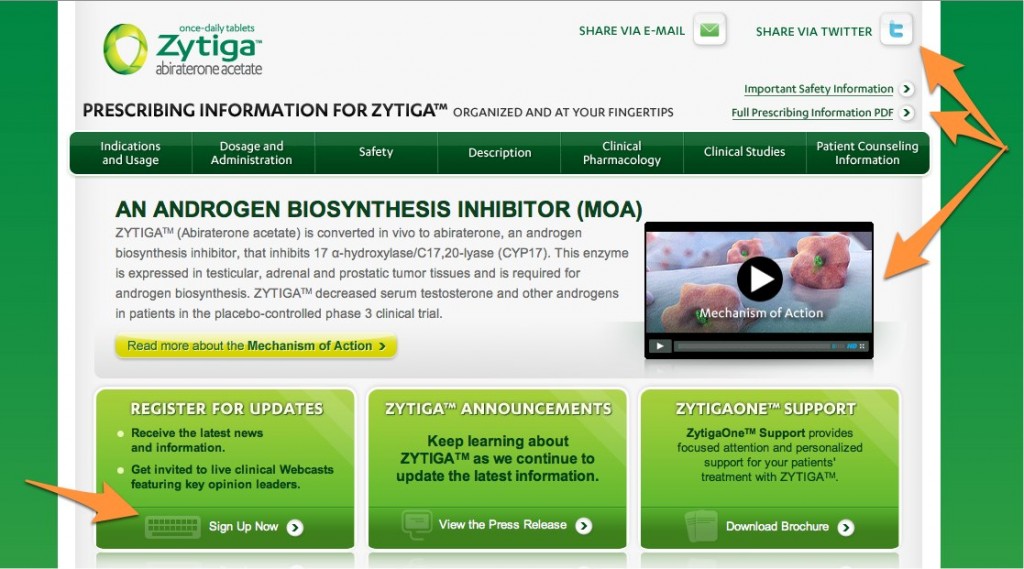
Yesterday, someone outside the US emailed me asking about access to abiraterone (Zytiga) outside the US, so I went on my iPad and to my delight and surprise found this on the Healthcare Professionals page:
abiraterone / Zytiga

Several key points to note here:

  1. You can share information with others by email and Twitter
  2. The PI was easy to find and click on
  3. The mechanism of action (MOA) video on Vimeo was high quality, interesting and sharable
  4. You can sign up for updates or view press releases easily
  5. The reimbursement support information was also easy to access
  6. The UI is uncluttered, has nice large text and is easy to navigate at a glance

In fact, the whole site was nicely laid out and easy to see things, click where you need to go and navigate with the well-thought out UI.  I didn’t have to pinch the screen once, which made a nice change.

Now, there are some glitches such as the patient information was a bit sparse and clicking the Contact Us section took me to the main Janssen website rather than a contact page, forcing me to scroll around looking for it there (hidden at the bottom in pale grey).  There’s no international number or email address when you finally find it, leaving me wondering what to advise my reader who contacted me for help.  This is where providing global Expanded Access Programs or local country contact details can be helpful – they will inevitably reach out, so not providing any help online is a tad antisocial.  There is more than just USA patients with advanced prostate cancer out there, after all.

If anyone from Janssen or Ortho Biotech Global is reading this and could point me in the right direction for helping patients and caregiver outside the US that would be great, as several enquiries a month come in on this topic.  There’s nothing worse than no information or not being able to help.  Companies ultimately live or die on seamless customer service and helping people with their needs.

The experience was pretty positive and I really liked the abiraterone website – it’s a good example of how nice UI design can make a huge difference to the UX for those visiting.  Whichever digital agency was responsible for this site did a very nice job so far and it breaks the cluttered, awkward to navigate with uncomfortably tiny font product website one normally comes across in this field – well done!

I’m hoping the Patient section will soon have some useful information to rival the HCP portal.  Putting in country contact details will be a good start in the right direction, as will information about ongoing clinical trials and a well designed, easy to read patient brochure about the disease, treatment and reimbursement information.  Yes – they do ask about the price and how they can save money – we get emails on that very topic every month too.

An excellent start overall – looking forward to seeing more developments in the near future!

“In God we trust, all others must bring data.”

W. Edwards Deming

The beauty of following many people on social media sites such as Twitter is that people in various communities, ie science, cancer, market research, PR and communications, etc all share links daily.  Occasionally, one catches my eye and reveals a hidden gem.

This morning was one of those days.                                                 Follow MaverickNY on Twitter

Take a look at this quick but useful (12 pages) slide deck on mobile health from Susannah Fox of Pew Internet:

Social media is changing the way we interact and do a lot of things

Mobile and access to wifi is very much part of facilitating that change.  Go out on a busy street at lunchtime and notice how many people are using their iPhone, iPad or Android PDA to access data or do something.   Wifi access is included in this category – can you remember the last time you connected your laptop or desktop to an ethernet cable – I can’t.  Everything is now wireless, even printing.

The consequence of this trend is that many people are now searching for health information online, via their mobile or wifi (6 in 10 according to the Pew Research).

Does this trend have an impact on Pharma?

Absolutely it does. This social change actually has many useful implications for Pharma and their agencies:

  1. Are your brand or unbranded sites optimised for mobile?
  2. Are your sites Flash heavy?
  3. Is it easy to access health or disease information you generate through apps?
  4. Is your site optimised for languages such as Spanish?

It always amuses me (not) how many Agencies have flash heavy sites when a client calls and desires a recommendation for a new vendor, which actually happens quite often.  PR and Communications agencies are notoriously bad at this.  If I’m trying to send a link to your site to someone on an iPhone and they can’t read it, I’m not going to refer you. Fixing this glitch and dragging your agency into the digital age will improve your image enormously – image matters.

Imagine what the experience would be for patients trying to find out health information on the go and they can’t access anything because it’s coded in ugly Flash?  They will quickly go elsewhere for health information.

Scaling a website from a desktop or laptop to a mobile device is very different, both in the look and feel.  This blog, for example, looks very different on a mobile device than on a PC screen – check it out for yourselves.  The optimisation makes it much easier to read a blog post.

If I have a horrid time trying to find the incredibly tiny Prescribing Information or Reimbursement link on your brand site on a laptop, it’s going to be very difficult for a patient or caregiver to find it on a mobile device.  That’s something that is very easy to fix and will improve things for patients immediately.

Optimise it with big clickable, easy to see and read buttons!  Make the text large, navigation and UI a breeze to read and use.  Easy to use sites will ensure repeat visits, increased customer loyalty and sharing of the content.  Hard to use sites will not.

The Pew Report highlighted two key trends in online health discussions that I think are really important to Pharma, which they defined as:

  1. The Mobile difference
  2. The Diagnosis difference

Where the Diagnosis difference is helping people find, read and share information about a disease or diagnosis.  This could be a patient or caregiver, but interestingly, 1 in 4 adults use apps on their Smart phones.

WebMD is a still a main destination site for people seeking independent health information, but apps are becoming increasingly important.  That one area where Pharma companies can make an impact in a thoughtful, rather than promotional way.  My big assumption here though, is that patients themselves are consulted for ideas through focus groups and involved in the development of tools for monitoring their condition that are useful to them.

The end result?  People are more likely to share links or apps virally and blog about them to others, thereby helping to increase awareness, adoption and hopefully, longevity if the site or app is really useful and fills an unmet need.

Overall, this is an interesting area where Pharma can get easily involved in Web 2.0 – what are your thoughts or comments?

2 Comments

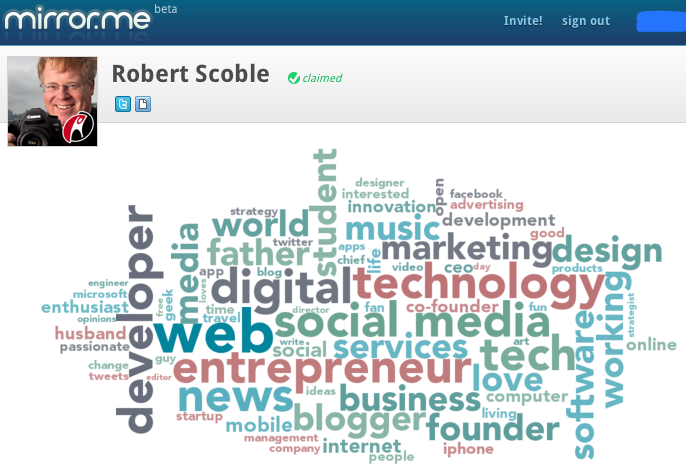
Some light hearted amusement for today is in order after the levity and gravity of the weekend.   One of my favourite Twitter buddies, Robert Scoble (@scobleizer) the tech geek, is always sharing cool stuff for people to try.  I noticed he posted a link to a new social media beta service, mirror.me, which creates a tag cloud of a user’s tweets.

Robert’s tag cloud looks like this, for example:

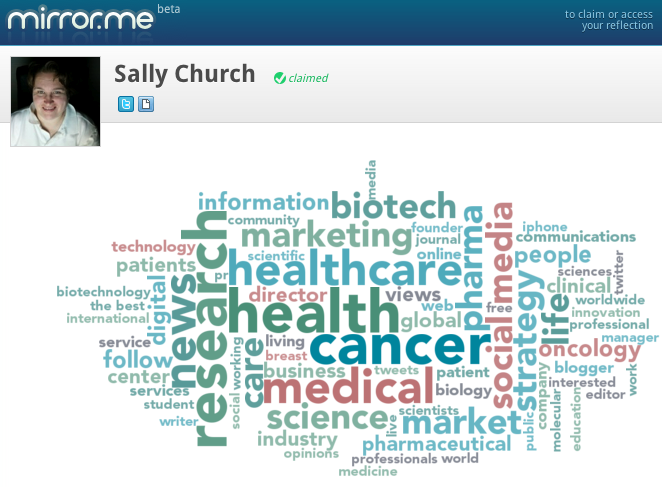
To create your tag cloud, simply go to mirror.me and authenticate the service using your Twitter username and password.  It then creates the graphic automatically, with the most commonly used words in a bigger font size.

Here’s my tag cloud as another example:

As other people join, it will also show your Twitter connections with their avatar (photo) and their tag clouds as they are created.  Very useful tool for seeing what people’s interests are and, presumably, something that will change organically if your tweets vary over time.

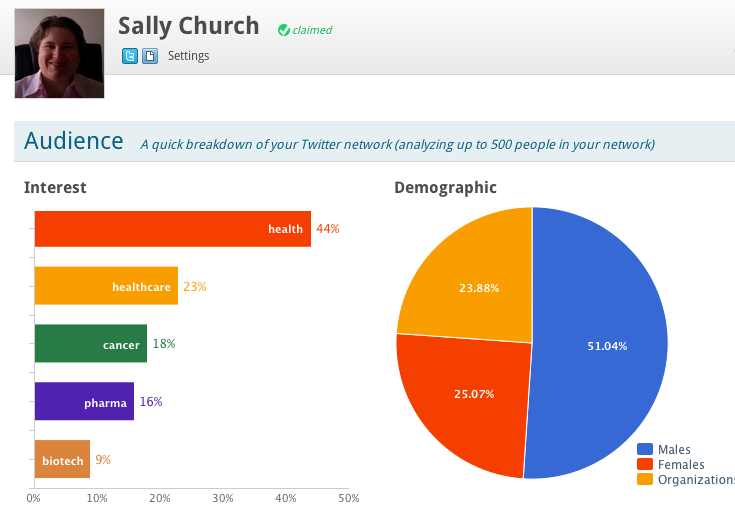
The tool will also show you some basic metrics, such as information about your followers and what their interests are based on their Twitter bio tags.  I was guessing that most of mine would come from the healthcare space:

Mirror.me metrics

Your results may vary depending upon your interests and followers.

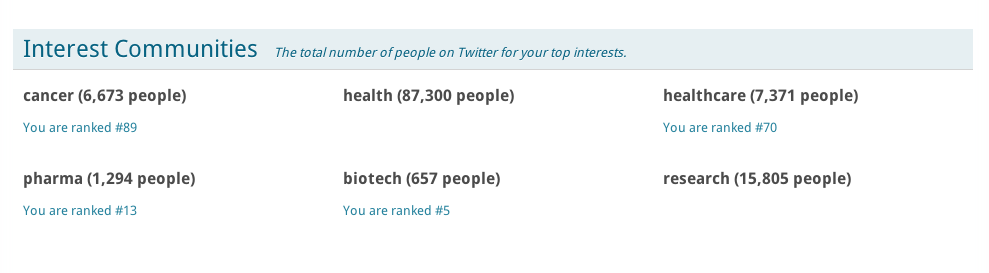
There are other metrics you can look at as well, such as rankings within your interests, but I’m not sure how this works yet:

mirror.me rankings

This feature is a little weird – some famous biotech companies are ranked lower than me and a bot tweeting people’s resumes is at the top of the biotech category, for example! That certainly gave me a smile for the morning 🙂

The good news is that mirror.me tweeted that they will be adding more features over time, so it should be a useful feature to follow and explore.


1 Comment

There’s been a lot of noise on the internet from some early adopters who think Really Simple Syndication (RSS) is dead with so much information now available, often shared by people through Twitter and Facebook.  For me, though, that’s not true and here’s why:

  1. It depends on the tool you’re using to consume the RSS feeds
  2. Not many people in my circle share cancer journal items I’m interested in
  3. I use RSS feeds as a searchable database for key information

What tool is useful?

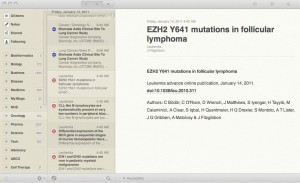
One tool I particularly love is Reeder, which can be used on a Mac computer, an iPad, iPhone or Android device essentially to read your RSS feeds hosted in Google Reader. You can read them online or offline.  This app allows you to skim through the news or science items in a more user friendly way.

Instead of clicking j/k and taking ages to move through items, the layout is much more pleasing and easier to read, like this:

Using RSS to search for interesting or relevant articles:

One of the challenges though, is that some journals such as Nature (in the example above) only provide the title and authors without even an abstract, which is frustrating and more than a little ungenerous of the publisher.

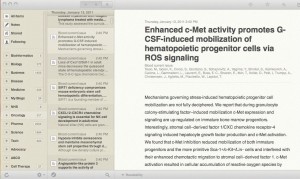
Others such as the Blood journal, however, do provide a useful summary of an article.  I found this one by quickly searching for ROS signaling, for example:

Once, found, it’s easy to star or bookmark for later use.  You can also cut/paste the information or quotes easily to notes or a presentation, adding to the overall utility of the tool.  It’s also a convenient way to search for information, assuming you have input journal RSS feeds into Google Reader, as I have done.  Although time consuming to do, it is well worth the effort in the long run.

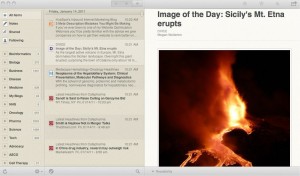
Pictures also show up really well in Reeder:

I particularly enjoy skimming, searching and bookmarking my journal RSS feeds while offline on a plane on a laptop as it is a great productivity tool, but this approach would work equally well on an iPad too, which would make flipping through the curated material even more user friendly.

If you have a Mac, iPhone, iPad or Android gadget, then head over here to check it out.

What do you like about RSS?

3 Comments

Recently, I’ve had a lot of enquiries as to how I manage to write so many blog posts, either in terms of finding the time or staying current.

The answer is simple – I use tools to help simplify and minimise the effort involved.  You could also use this kind of web 2.0 approach for creating a database and tracking data, intelligence, keeping current if you work in the Pharma or Biotech industry, whether a scientist, a marketer or a PR professional.  Of course, you could spend hours Googling stuff or reading a few health sites online, but there are other ways to stay ahead of the pack.

The key parameters at play here can be summarised:

  • Gather data
  • Process and understand information
  • Perform analysis
  • Generate Insights

Far too many people often only do the first two tasks, but without analysis and insights, the data means very little.  So what are the tools of my trade?


1. Evernote

I’ve talked about Evernote in the past, which is a nifty data capture tool we use daily here at Icarus Consultants. They have both free and premium versions to suit everyone’s pocket.

When starting projects, we clip relevant information from the internet into a new Evernote Notebook and gather it all in one place. You can use a desktop or a smart phone for this task and dump as much information as you like into it for later searching. This makes it easier to digest when looking at the big picture and gathering ideas and seeing trends.  You can also search your own database for existing information, which is very useful for blog posts or writing reports around a topic.

I often create and write blog posts in Evernote too.  The research information is already there and it’s straightforward to use the editor as well, as backing up and synchronising the information across multiple platforms.  We’ve all written something in Word or a Blog Editor and lost the content >.< but l have found Evernote more reliable for saving information, which can then be cut/paste with minimal editing into the Blog platform or Office for reports. I also have a bunch of articles, reports and blog posts that get part drafted and finished later, acting as a useful repository for gathering ideas.

Other good uses? Need some information on the road while talking to someone? A quick search in the app my iPhone will usually bring it up.

The other side of the coin is generating and gathering data. I’ve mentioned that you can clip research to an app such as Evernote on the go, but I also have a LOT of information in RSS, whether it be news items, feeds for the latest articles in tens of cancer and science journals, blogs from a variety of sources, rss alerts by topic or keyword etc. Keeping track of this huge volume of information used to be unwieldy.

2. My 6 Sense

One tool I really love and have been using for a while is My 6 Sense.  This cool app takes all the rss feeds from my Google Reader, which is clumsy and awkward to read, and processes them into a more manageable fashion.

Several times a day I can check the app on my iPhone and see what’s new or relevant.  Over time the app algorithms learn what your particular interests are and creates a page of what it considers to be useful items of interest in your RSS feeds via the Relevance tab or as they come in (the Time tab) as shown below (left photo).

Data is social, though; it cries out to be shared with others. The M6S app allows you to add social media sites such as Twitter, Facebook etc and share any interesting items with your friends or colleagues too. Here, you can also see the items from my shared stream as an example of what I found interesting and streamed to others to read:

Over time, as you use the app more, it gets much better at predicting what you like or may find interesting. One thing I miss from the M6S app is a Search button – what happens if I want to find a bunch of interesting articles in my RSS database on a given topic, eg PI3K or something similar? At the moment, there’s no obvious way to do that as far as I can tell, but it would certainly be really useful to me.

3. SimpleNote

I confess that after years of losing data unexpectedly, I’ve become a bot of a plain text geek. On my Macs, TextEdit was something I use daily, especially when taking notes from market research interviews on the fly. Then one day, someone mentioned SimpleNote, which is a beautifully simple yet flexible tool for gathering text notes.

For some months now, I’ve been using the App on my iPhone, which allows me to jot down ideas, tasks, notes to self etc on the fly… essentially simple notes.

Then recently, I realised that the free iPhone app also gave me access to the desktop app, which opens up a whole new world of utility and practicality.  Here was something that could help me do multiple things efficiently:

  • Research and find interesting journal articles or news about say, PI3-kinase in My 6 Sense
  • Email article links to self via iPhone
  • On desktop, cut/paste multiple snippets of information to SimpleNote
  • Search SimpleNote for older articles
  • Write blog post in SimpleNote
  • Cut/paste blog post to TypePad for posting
  • Sync selected information with DropBox and read from any computer later

Take a look at the snapshot below for the basic SimpleNote concept:

You can see how neat and intuitive this is at first glance and how easy it is to find information, whether it be data or contact information or even the reference link months after clipping it by scrolling down in an individual note:

The DOI is really useful because when I blog about journal articles, I only have to cut/paste the DOI into the Research Blogging site and it generates a nifty bit of code that provides easy access to the article via a link for anyone interested in it.

Over time, I diligently put in tonnes of stuff into these tools, whether Evernote or SimpleNote and they come in very handy for research for blog posts and consulting reports. Essentially, I find that I tend to use Evernote for web clipping and SimpleNote for text processing.

Of course, the short answer to the blogging question is you either get more efficient and smarter at gathering, processing, analysing and generating insights or you work longer hours.  Being a good European, I’d rather work smarter and hope that people appreciate the insights generated either in the blog posts here or in client report :-).

What are your favourite tools and apps that make a difference to your daily workflow?

1 Comment

At a session at the American Psychoanalytic Association meeting here, Leli said he conducted his first Skype analysis with a Chinese patient in 2004.

"When I did my first Skype analysis, I had many doubts," he said. "Will the analytic process develop? Will there be language differences? Cultural differences?"

He soon began to feel that the Skype analysis was "similar to any type of analysis."

via medpagetoday.com

Modern technology can be used to reach and help patients around the world, not just in the doctors office. This example involved a Physicians office in New York and a patient in China for psychoanalysis, both talking on Skype via phone and video.

It's amazing what can be done these days. And then I recall that my own PCP insists on office visits and will barely even use the telephone, except in dire necessity for phoning in a prescription to the local pharmacy.   SMS?  Never, which is a great shame.

That said, I think it's great that Skype is a great start – imagine what could be done down the line with Cisco's Telepresence?

Posted via web from sally church's posterous

One of my Twitter buddies, Dr Bertalan Mesko (@Berci) has built a superb collection of RSS aggregators, catchily called PeRSSonalized Medicine, on his Webicina site around different medical topics a broad range of topics including diabetes, depression, cancer, psoriasis, nephrology etc. He graduated from medical school last year (while running ScienceRoll and Webicina!) and is now a qualified doctor with a strong interest in genetics as well as research in psoriasis and rheumatoid arthritis.

Here's the full list you can choose from:

Picture 80
 

More recently, he extended this excellent theme and launched his Pharma resource as you can see at the bottom of the above checklist.  Here's the Pharma site in more detail:

Picture 79
As you can see from the screen shot above, it includes
medical journals, blogs, news and web 2.0 tools shared via various Pharma bloggers on Twitter; all the content is efficiently organised alphabetically.

Of course, I was delighted to see this humble little blog included, but do check Berci's excellent resource out because it's well worth looking at. You can also follow him on Twitter for more regular updates. The site is free, just sign up and away you go. 

Overall: It is a well executed and nicely curated medical site for physicians and patients alike – great job, Berci!


{Disclosure: This website, Pharma Strategy Blog, is included in the Pharma site I just reviewed and I am therefore undoubtedly biased in reviewing PeRRSonalised Pharma, but please do check it out and see for yourselves what can be achieved with medical information and web 2.0 tools.  If more pharma sponsored sites had half a much independently curated and unbiased information, they would probably do very well.}

2 Comments

Image representing Twitter as depicted in Crun...Image via CrunchBaseOne of the coolest web 2.0 tools I've come across this year is Twitter.   It's a microblooging platform that operates on the web cloud.  You can follow and be followed by a variety of interesting people from friends, to cancer patients, scientists, tech geeks and business people to CEO's.  Everyone communicates by posting micro-blogs, i.e. sentences of 140 characters or less into the cloud.

What's the point of it, you may ask?  Is it an echo chamber?

Well yes, it is an echo chamber to a certain extent, but some limited conversations to ensue back and forth and often lead to stronger connections offline by email or telephone.   The real value in it though, from a business perspective, is as a knowledge management database.

The point for me, is that if I follow smart and interesting people, I learn faster and gather a lot of information from new blogs, news, websites, bookmarks etc that people post as interesting links than I would otherwise have the time for on my own.  Twitter provides a useful filter for fascinating information that is shared and absorbed on a subconscious level.  For me, the more noise, the better and the bigger the database you can research.

So how do you find relevant information?

Using #hashtags for certain events such as conferences or topics (e.g. knowledge management or #km) allows people to track pertinent information when using the search function within Twitter across the whole Twitterverse lifestream. 

You can also type in simple keywords such as the Presidential candidates names, companies or products you might be interested in and review the data generated in the search.  At first, the Public stream might seem like a lot of noise, but using keywords for your search allows you to parse it for critical and useful information.

Lilly's recent purchase of ImClone is a case in point.  After ImClone rebuffed their Erbitux partners, BMS, you could follow opinions and thoughts on both deals using Twitter search.  Kinda cool, especially if you followed the cloud in real time by piping an RSS feed of the searches into your Google Reader for digesting and evaluating.

Recently I was interested in a recently approved drug and wondered kind of reaction it was getting.  Searching on Twitter yielded some early signs of side effects and clincial trials in other cancers.  Very useful stuff.

Meanwhile, I have yet to see conservative Pharma or Biotechnology companies latch onto the value of Twitter, but a number of smart mainstream companies such as Dell, Comcast, Wholefoods and Zappos already have either their employees or the company piping information out to the public.  It's a great way to communicate with their customers, solve problems, get feedback, improve customer satisfaction and retention.

Are you on Twitter?  If not, give it a try, you may be surprised.  Oh, and you can always follow me by clicking on the Twitter button on the side 😉

Reblog this post [with Zemanta]

As the pharma market becomes extremely competitive with increased competition, fewer new approvals, generic threats with blockbuster patent expiries and major layoffs, making the marketing dollars go further is an imperative.

One way to do this is through smart and judicious use of competitive and market intelligence.  These approaches allow the collection of primary and secondary data sources, including key opinion leader interviews, to help form a strategic picture of the marketplace or answer critical questions that drive the brand forward efficiently and cost effectively.

Many CI companies rely on junior analysts in India and China to do the research in a bottom up approach of data gathering.  However, these anlaysts, while bright and sharp, often do not know much about the disease area in question or the nuances of the US marketplace.  Fortunately there is, however, another way.  What we prefer to do is the complete opposite i.e. a top down approach that takes the critical questions posed by the client and then create and test models or hypotheses to verify the answer.  This is much more data intensive but more rigourous.

But how is this done in practice? 

Even within my specialty, oncology and hematology, there are masses amounts of information floating around each day, and bearing in mind most tumour types are treated differently, almost as a different disease, it might be easy to get overwhelmed before you even start.  There are efficient ways of sorting out the vital nuggets though.

One really useful tool is judicious use of an aggregator such as Google Reader, Bloglines etc.  This is one of my favourite web gadgets; you add RSS feeds for journals, science magazines, industry websites and sources, company websites etc and then scan them daily for the hot new information to get a snapshot like this:

Picture 12

Along the way, you can 'Star' any interesting articles for later reading or sharing with friends and colleagues.

You can also use this database to search for current information on a given topic, eg renal cancer either by list or search synopsis view:

Picture 13

Picture 16

Once you find what you need, you can 'star' the items for later retrieval in the starred items window.  It also makes scrolling through the items very easy and much more intuitive on the eye graphically.  Interesting articles can also be viewed at a click in the expanded view, which shows a little more granular detail:

Picture 24

Now, that's a powerful way to drill down for useful data.  It's a very quick and fast way of finding relevant information at your finger tips.  Of course, you can use PubMed or Google Scholar to find journal articles, but the challenge is you will often get a lot of irrelevant or highly obscure stuff on preclinical research that you have to somehow troll through to find the one nugget you actually need, like this:

Picture 26

By controlling the input, ie the types of journals and magazines you want to search, you can current clinical trends or news much more quickly.

Once interesting and relevant articles have been found and starred, you can view these en masse in the starred items section as an overview for speed reading, but there is another technique I use to gather and mine the intelligence.  What you really need is a database for assimilating the selected data asa group.  Enter Evernote.

Evernote is a Web2.0 tool fantastic way to clip information on a given topic and save it in one file for easy reading and mining.  You can add tags for easier searching.  It can also house the websites, references etc that are needed for a final client report.  It makes the job so much easier.  Here's a snapshot of my Evernote database; you can see the list of notebooks on the left hand side and a sample of some articles clipped to my science notebook on the right hand side:

Picture 27


There is even a new cool facility to import Delicious bookmarks – I had over 500 of them, mostly on science and medically related topics, including many on cancer.  Importing them into Evernote added to the powerful search within the overall database of information and saves me hunting through two different sets of data.

Each of these notebooks contains a veritable treasure trove of information, all stored, tagged and ready for searching at a moments notice.  It can even be used on the iPhone to answer a question quickly when a client calls with a query.  Yup, it has happened and the solution was right at my fingertips!

These are just two of the tools I use in my job on a daily basis to undertake competitive and market intelligence.  Finding trends and patterns amongst the mass of data is suddenly made a whole lot easier and faster.  And time is money for clients, especially in the current downturn when marketing dollars are tighter and scarcer.


Reblog this post [with Zemanta]
5 Comments

This morning I was listening to a short talk on YouTube by Gary Vaynerchuk from WineLibrary at Web2.0.Vlog Soup - Wine Library TVImage by stevegarfield via Flickr 


You can watch it yourself here


It was one of the most inspiring things I've heard this year and it got me thinking more critically. 

Often, we get asked by clients why do we 'only' do a few specialist areas – oncology, hematology, immunology, GI and respiratory medicine.


The answer is very very simple.

Sorry, but I really can't get excited about fungal toenails or suchlike.  Yes, we could have more clients and make more money having a broader focus doing anything under the sun that is related to the pharma industry, but it's what excites me, what I'm passionate about that matters much more. 

The oncology and hematology marketplace is exciting to me, it's interesting; a fascinating, complex area of different sub-diseases, treatments, pathways, mechanisms and targeted therapies.  Our brand equity is heavily invested in knowing this specialist subject well and that's what people ultimately call for; expertise and knowledge.  

If you're going to spend 15-18 hour days working on building a consulting business, or indeed any business, then wouldn't you rather spend it on subjects that you love and are passionate about?  At least, I think so, and it makes the job much more enjoyable, more of a vocation than a job, in fact.

Our time on earth is too short not to do things we really enjoy and if we have a chance to do what we want to do, why not grab it with both hands? 

Reblog this post [with Zemanta]
error: Content is protected !!