SpringPad is a new free tool I’ve recently been playing with and it has quickly become a way to sort and organise information easily. In the past, I’ve been a big Evernote fan, but while it is useful for collecting abstracts, photos, papers etc, SpringPad has a whole different set of utilities that I find myself using on a daily basis, both in the office and while mobile at conferences.
One of the challenges in my work is sifting through vast amounts of data and generating useful insights, either for posts here on this blog or as a consultant. I’ve tried a lot of different web 2.0 tools over the last 7 years but occasionally one comes along that sticks in my workflow. SpringPad is one of them.
The first thing I did after signing up was download the iPhone app and the web clipper for Chrome, my preferred browser. This makes life a lot easier when you come across anything interesting:
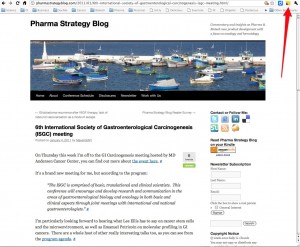
You can also email items such as webpages, links and PDF files to SpringPad.
Once in the SpringPad web app (similar layouts for the iPhone are available in an app too), your top level notebooks appear something like this:
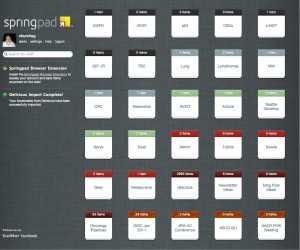
You can colour code them for easy visual appeal and finding things. I’ve also hidden the mission critical client projects, but you can see the general gist of what my recent science topics looks like.
The nice thing about this approach is that you can create Notebooks by topics and then once you’ve clipped or emailed relevant information to SpringPad, it can be organised efficiently.
For example, the JP Morgan Healthcare conference is ongoing this week with lots of useful snippets emerging by company, drug and pathway. I can clip, then tag the information and also assign it to several Notebooks. Information emerging from the meeting on Keryx’s perifosine might get added to the Keryx, colorectal cancer and myeloma Notebooks, for example. This makes it easier to find information later when you search for it, or later look at all the information you have collected to date on say, lung cancer or a particular pathway, to look at the big picture trends. I also diligently tag items across a broad range of topics so they will appear later in the database searches.
Another useful feature of SpringPad is that you can collate information around an event.
Once inside a notebook, for example, the recent one I created for the ISGC meeting at MD Anderson to keep me organised with a one stop shop for all the preconference information, to-dos and post conference notes looked like this:
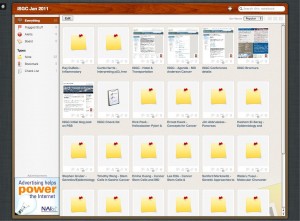
While travelling to this meeting, I had everything I needed for the event in the iPhone app and could add new notes, to dos, places, contacts etc while on the road for other projects. This worked really well, even on the plane, since SpringPad will sync the notes once internet access is available later.
The iPhone is small so it is not good for rapidly note taking at meetings and wifi was gippy at best, so I made most of the notes on my Mac laptop in Twitter using a hashtag and also in an offline text app, Notational Velocity, which syncs with Simplenote. I’m now looking to see if I can email my notes on each presentation to SpringPad or worst case scenario, cut/paste them into the notes created. Another way to do this efficiently would be to use an iPad, but that’s still on my wish list in the Gear Notebook 🙂
Assigning dates to To-Dos and items is a really useful feature – you can check your Alert box and see what’s immediately due.
Another feature I like is the ability to import Delicious bookmarks (I have 3,000 of them!) as well as the associated tags, so these are now searchable in the context of any other information I might have collated in SpringPad. When a client rings up or sends an email asking about something, this makes the scientific, commercial or clinical answer much easier to find than Googling and getting lots of spammy results, which seems de rigeur in public searches of late.
There’s a lot more functionality in SpringPad not covered in this review, but I will add more updates as it becomes more familiar and a bigger database is built up. Has anyone else tried SpringPad yet? If so, what were your experiences or do you have any cool tips to share?